Live preview & comparison
See what you’re saving.
See actual encoded file sizes as you work. Compare the original and export with a wipe, shared zoom, 100% inspection, and backgrounds for transparent images.
How it worksThe app / The details that matter
A focused toolkit for the practical side of image making. Native to your Mac, and ready for the way you work.
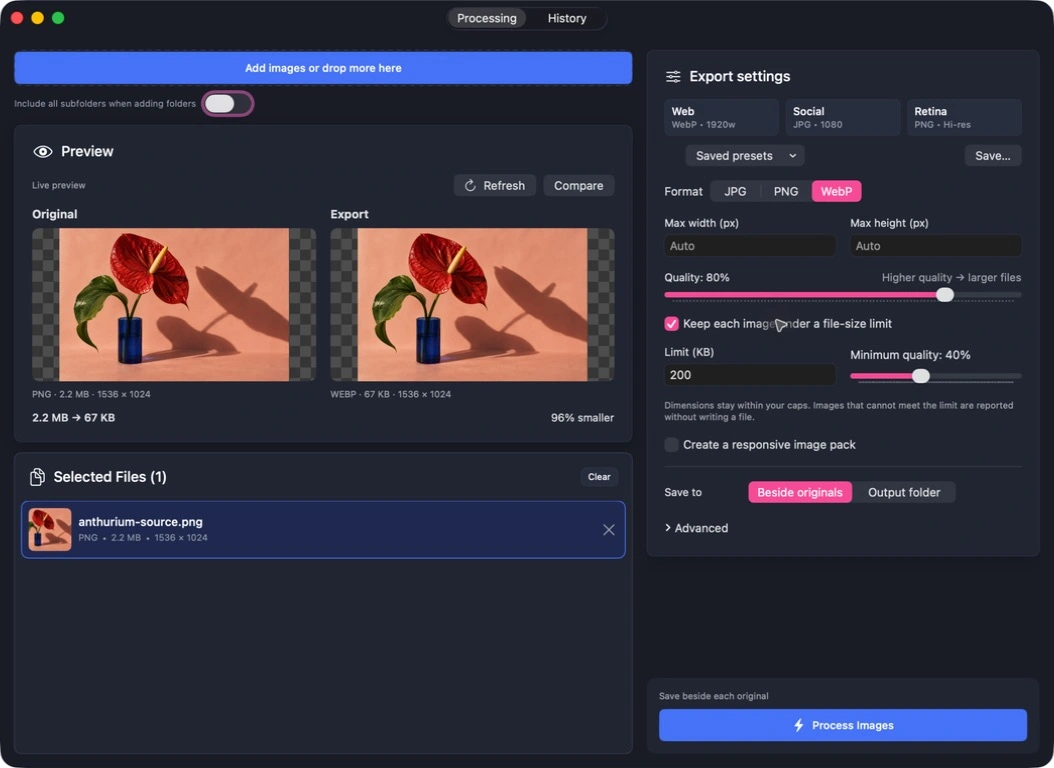
Live preview & comparison
See actual encoded file sizes as you work. Compare the original and export with a wipe, shared zoom, 100% inspection, and backgrounds for transparent images.
How it worksFile-size limits
Set a per-file budget and the lowest quality you’re happy with. The app finds a fit within your settings, and reports any output that cannot meet the limit.
How it worksResponsive image packs
Export up to eight WebP widths, with optional JPG fallbacks. Actual-width filenames and copyable srcset make the handoff that little bit easier.
How it worksReusable export recipes
Save format, dimensions, quality, size limits, widths, naming, and destination as one preset. The next batch starts with the decisions already made.
How it worksHistory & recovery
Search jobs, reveal outputs, reuse settings, rerun a batch, or retry unfinished variants. Cancelling a job preserves the work already completed.
How it worksA native Mac workflow
Command-O to add. Command-Return to export. Choose a saved preset for optional automatic conversion when you open files from Finder or drop them on the Dock.
How it worksSpecifications The essentials