The image finishing tool / For macOS
Less weight.
More image.
For the images you’ve spent time getting right. Resize, compress, and export them for the web, with a clear view of every detail.
V1.2.0 · Apple notarized · Entirely on your Mac

01 A closer look
The last step.
Worth getting right.
Your composition is done. Now make the files fit. See the original and export together, tune the balance, and send the whole batch on its way.
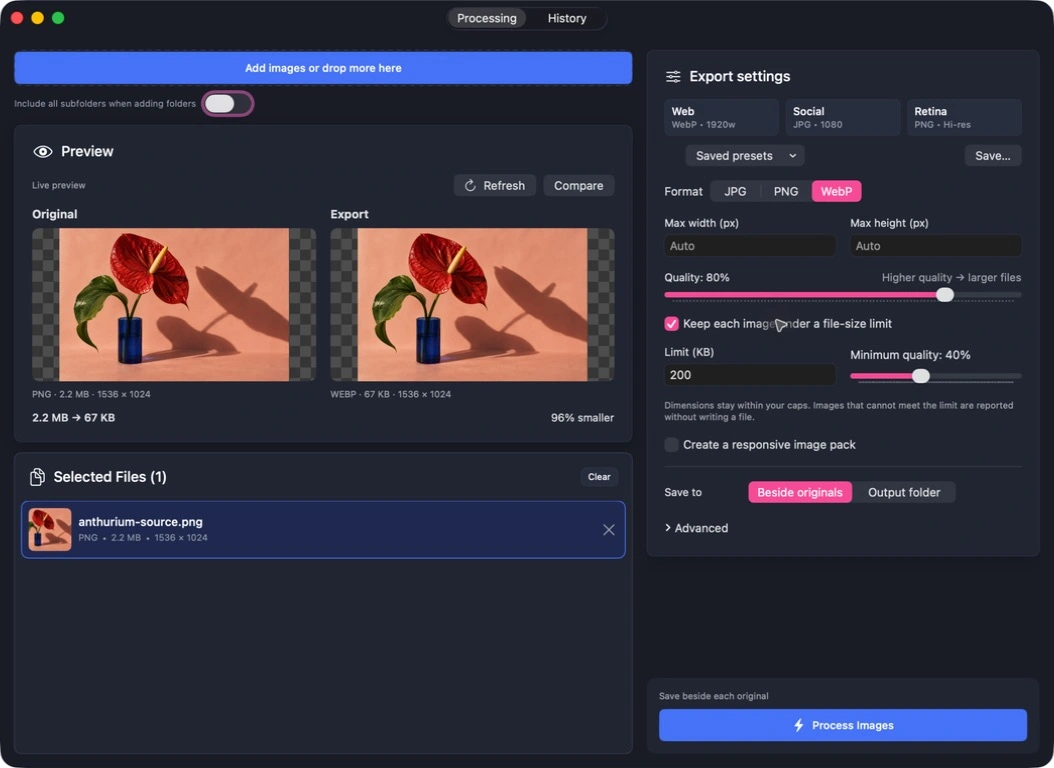
Keep your eye on the image.
Live encoded previews, a comparison wipe, and 100% zoom. Choose the balance with your eyes open.
Give every file a budget.
Choose a file-size ceiling and minimum quality. If a file cannot fit, you’ll know before it goes out.
Everything stays on your Mac.
Your images, your folders, your workflow. Local processing, with no uploads or account required.
02 A considered handoff
One image.
Every place it goes.
A smaller screen. A bigger display. A JPG fallback, just in case. Export a family of WebP sizes together and copy the srcset when you’re done.
Build your first image pack

03 Less repetition
Find your settings.
Keep your rhythm.
- Save
A recipe for the next time.
Format, quality, widths, naming, destination. Save the whole setup as a preset.
- Repeat
Your history has a future.
Find a batch, reuse its settings, or pick up the exports you didn’t finish.
- Go
At home on your Mac.
Keyboard shortcuts and optional Dock conversion keep familiar work moving.
Colophon Why it exists
Good image work deserves a good handoff. The Transmogrifier is an independent tool by Clear pH, built for the everyday work between a finished design and a finished website.
What’s new in 1.2